Hold X and drag a part to pull it out of a cluster or array without exploding the whole thing. It works on any cluster, including nested clusters, common-line clusters and arrays.
1.Hold X and move the mouse over a cluster. Small move handles appear on its parts, and the part under the cursor is outlined. When the plate is zoomed out, the handles only show on the cluster under the cursor, or a selected one.
2.Still holding X, click the part. Shift+click adds parts, or removes them again. You always pick the innermost part under the cursor, through nested clusters.
3.Drag the part (or parts) out and release. A piece dropped off the plate floats there, not nested.
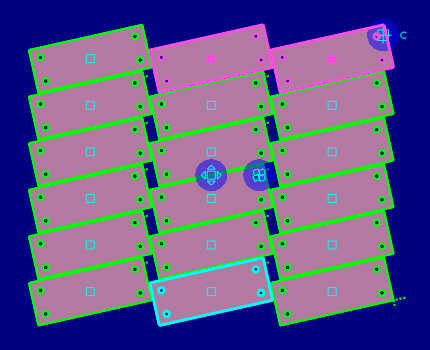
Nothing else moves. What happens to the cluster you took the part out of:
•Common-line cluster or strip: the outline is healed across each line the part shared, using the neighbour's own edge. Taking a part from the middle of a strip splits it in two; runs of two or more stay common-line arrays, and single parts become ordinary parts.
•Chain: the neighbours are linked up again.
•Spine: the spine is rebuilt over the remaining parts.
•Crop cluster: the crop is rebuilt for what remains.
•Ordinary array: the pulled cells become single parts and the rest becomes the fewest rectangular arrays needed.
•One part left: it becomes an ordinary part.
If the connectors cannot be kept, the cluster is exploded and a one-line notice appears at the bottom of the canvas: "Cluster exploded - its connectors could not be kept. Undo to restore". If a crop cannot be rebuilt it is removed, with a similar notice. Undo (Ctrl+Z) restores it.
[SCREENSHOT TO COME: pull-out-exploded-notice.png - the canvas notice at the bottom: "Cluster exploded - its connectors could not be kept. Undo to restore"]
Pulled-out parts are never force fitted automatically, and keep their processing where it is unchanged. To put a part back, or join it to something else, use Glue Common.
See also Exploding Clusters, Common-Line Arrays, Glue Common.